Produced quantity
6 kits
Record the assembly output and its destination bin through the supported workflow.
CAPABILITIES / MANUFACTURING & PRODUCTION
Bring assembly definitions, work orders, station queues, and work in process into one connected production workflow.
Follow an assembly through its stations. Your routing and inventory posting follow your configured process.
MANUFACTURING & PRODUCTION
Start with the materials, follow the work through production, and connect the result to inventory.
BILLS OF MATERIALS & ASSEMBLIES
ORCA supports component definitions, assembly work, and material planning. Configured workflows connect required materials to available inventory and the work being prepared.
Associate component items and units with the assembly.
Use supported material planning and availability views before creating or releasing work.
Record component picking, returns, or scrap through the applicable assembly process.
WORK ORDERS & STATION QUEUES
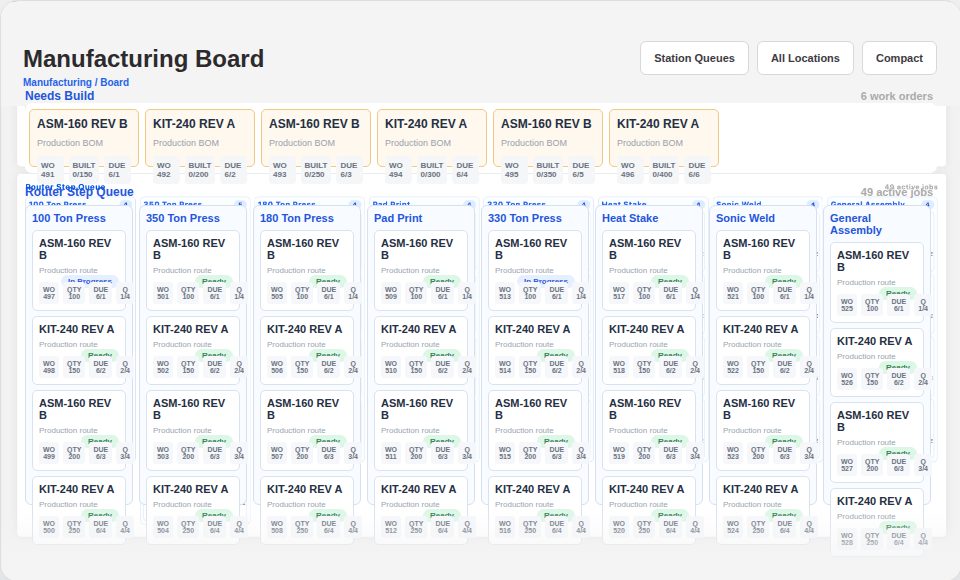
Manufacturing boards organize work by production station and process step. Work-order cards can show remaining quantities, due dates, and whether a step is waiting for an earlier operation.
WO-2048 calls for 20 kits. Preparation is ready; downstream work remains waiting for its earlier operation.
Select a station to explore the example. These controls explain the workflow; they do not change a work order.
WORK IN PROCESS
Explore work in process by step, SKU, station, or employee. Expand a SKU to inspect work orders, batches, and station detail, and narrow the view by location or process step.
Where timing data is recorded, aging views help identify work to investigate. Untracked or imported history may have an unknown age.
Illustrative quantities at distinct stages, not a live report. Recorded output is not necessarily posted stock.
Move from an item summary to its work orders, batches, and stations. Give the team a specific place to investigate the next handoff.
Explore production visibility →PRODUCTION & INVENTORY
Assembly workflows support recording produced quantities and the destination bin. Component handling, lot requirements, routing completion, and finished-inventory posting depend on the configured process.
Record the assembly output and its destination bin through the supported workflow.
Follow routing, lot requirements, and completion rules for this process.
Post finished stock at the point defined by your inventory and completion policy.
Illustrative handoff. Recording output and posting finished inventory can be separate steps.
LABOR & REPORTING
Where configured, recorded time can connect to production work. Reporting options help review production activity alongside the operational record.
COMMON QUESTIONS
Yes. Configured stations and process steps organize the manufacturing board, while work-in-process views provide additional ways to inspect production.
Shortage tools depend on the enabled manufacturing and inventory workflow. We’ll review your configuration before defining the material-check process.
The posting point depends on the configured assembly and completion policy. Recording output and completing a routed work order can be distinct steps.
Supported time workflows can associate recorded time with production work. The available detail depends on configuration and how time is recorded.
BUILT AROUND YOUR BUSINESS
Show us your stations, routing, material handling, and completion rules. We can scope specialized production workflows, interfaces, and reporting alongside the ORCA capabilities that already fit.
LET’S WALK THROUGH IT
Bring its components, process steps, and the handoffs your team needs to manage.