Put stock in context.
Connect item and location data with inventory visibility. Help your team understand what’s available, where to look, and what needs attention.
ORCA + NETSUITE
Know where inventory stands. Give the floor a clear next step. Keep NetSuite connected to what actually ships.
ORCA connects receiving, inventory, picking, packing, and shipping with NetSuite—so your team can move work forward without rebuilding it in the ERP.
For distributors, brands, and fulfillment teams running NetSuite.
ORCA is trusted by operations teams at












01 / KEEP INVENTORY IN VIEW
Give operators the warehouse detail they need to work confidently. Connect NetSuite item, inventory, and location records with the receiving, picking, and movement happening in ORCA.
Connect item and location data with inventory visibility. Help your team understand what’s available, where to look, and what needs attention.
Support bin mapping and transfer workflows between ORCA and NetSuite, configured around your locations, enabled features, and warehouse process.
Review stock movement and integration history when records don’t agree. Give your team the context to investigate instead of starting with another spreadsheet.
BARCODE SCANNING & DOUBLE VERIFICATION
A correct pick is the start. Add a second check before shipping to help catch the wrong item or a missing quantity while the order is still in your warehouse.
Use barcode scanning in ORCA’s picking and packing workflows. Identify products by their barcodes and give operators a clear way to confirm what they’re handling.
Add scan verification after picking. ORCA checks the scanned item against the shipment, counts verified units, and flags items that don’t belong or are already fully verified.
Configure ORCA to block shipping until all shipment items are verified. See verified quantities and who performed the verification, with a clear view of what still needs checking.
Help prevent wrong shipments, reduce rework, and make the final check part of the workflow.
See scanning and verification in action →02 / CONNECT THE ORDER TO THE DOOR
Bring NetSuite orders into the warehouse workflow. Guide the work from picking to shipping, then carry the fulfillment details back to NetSuite.
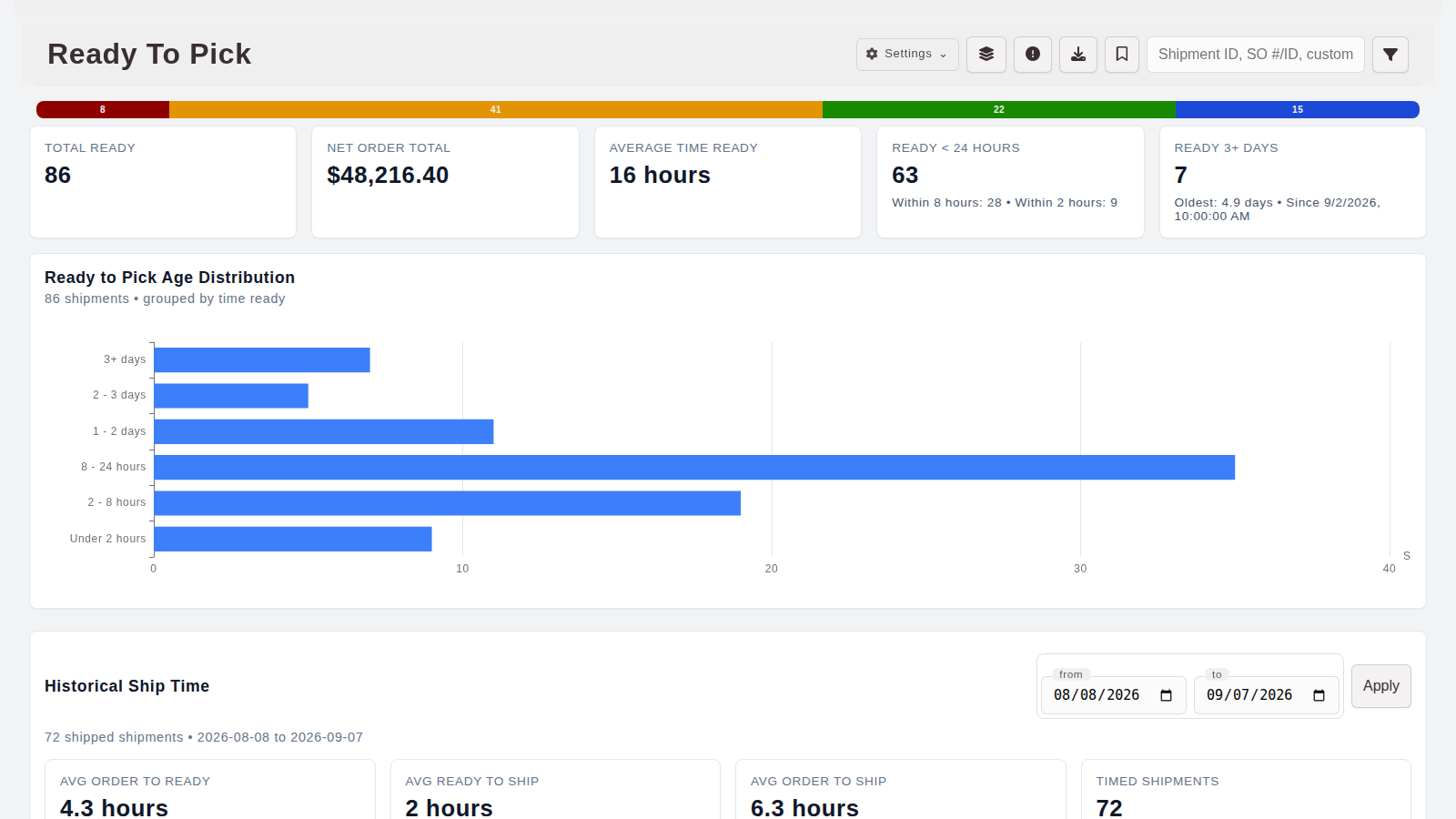
See ready-to-pick orders, waiting work, and aging shipments in ORCA.
Guide picking and packing, capture carton details, and support customer-specific labels and shipping documents.
Post item fulfillments with shipment and package context. Keep failed posts visible so shipped work doesn’t silently stop at the warehouse door.
03 / CONNECT THE RECEIVING DOCK
Stop turning every arrival into a second round of data entry. Connect NetSuite purchase orders and inbound shipments to ORCA receiving, then send receipt information back to the ERP.
Bring purchase orders into ORCA and work from the expected items and quantities. Connect receiving outcomes to NetSuite item receipts with the required item and location mappings.
Explore purchase order receiving →Use NetSuite inbound shipment context in your receiving workflow. Carry received quantities and configured bin details into the receipt handoff.
Keep missing mappings and posting failures available for follow-up, so the team can resolve what is holding the receipt back.
Talk through inbound receiving →BUILT AROUND THE WAY YOU OPERATE
Customer requirements, packaging steps, and accounting handoffs should travel with the order. ORCA connects those details to the work your team is already doing.
Map your NetSuite workflow ↗Configure guided picking, packing, labels, and documents around your customers’ requirements while preserving the connection to NetSuite.
Support invoice posting and sales-order-to-invoice workflows in NetSuite, with the trigger and accounting ownership defined for your operation.
Work directly with the people who build ORCA. Trace integration requests and responses alongside operational records when a handoff needs attention.
A FEW PRACTICAL QUESTIONS
No. NetSuite remains your ERP. ORCA connects the day-to-day warehouse workflows around it. We’ll define which system owns inventory, orders, and accounting records as part of setup.
Supported integration paths include items, inventory, locations, bins, customers, vendors, sales orders, purchase orders, inbound shipments, item fulfillments, receipts, and invoices. We’ll demonstrate the specific directions and workflows you need.
Bring your NetSuite customizations, customer requirements, labels, and packing rules to the walkthrough. We’ll map the supported paths and identify any additional configuration or development required.
Timing depends on the configured workflow, background jobs, and NetSuite availability. We’ll define what updates, when it updates, and how the team follows up on failed requests.
Choose the handoff causing the most work: receiving, inventory, fulfillment, or invoicing. We’ll review your NetSuite features and permissions, walk through the ORCA workflow, and define the connection before implementation.
LET’S CONNECT THE WORK
Tell us what your team handles today and where NetSuite handoffs take too much time. We’ll arrange a demo focused on your operation.